Run AI locally on a Mac for free: we tested Apple's built-in AI on 5 everyday tasks
You don't have to download anything to run AI on a Mac. If it has an M1 chip or later and Apple Intelligence, a language model already runs on the Mac itself. We gave it the same five everyday tasks we gave Claude in our last test, timed every answer and scored them the same way. Then we paired it with Whisper, a free open model, to turn a voice memo into a to-do list.
Step 1: check that your Mac can run it
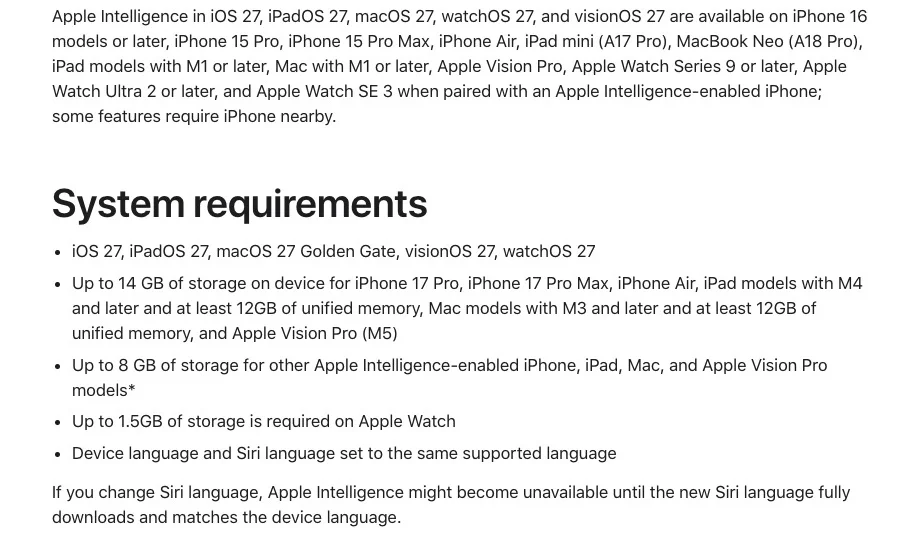
Apple's support page lists Mac with M1 or later, the current Mac software (macOS 27), and the Mac and Siri set to the same supported language (English and French are on the list). Apple Intelligence can take up to 14 GB of storage on Macs with M3 or later and at least 12 GB of memory, and up to 8 GB on other supported Macs. Our test machine: a Mac mini with an M4 chip and 24 GB of memory. It came with the software update; we paid nothing extra.
Step 2: use it without code, in Shortcuts
- Open Shortcuts
Create a new shortcut.
- Add Use Model
Search for the Use Model action, double-click it, then choose On-Device.
- Type your request
In the text field below "Use model". The four-part prompt below works well.
- Show the answer
Add the Show Content action, select Response, then run the shortcut.
Apple describes the On-Device option as handling "simple requests without the need for a network connection". For our test we ran Apple's on-device model through Apple's developer framework (Foundation Models) instead of the Shortcuts app, so we could time each answer. We did not film or test the Shortcuts app itself.
Our test: 5 tasks, 2 prompt styles, 3 checks
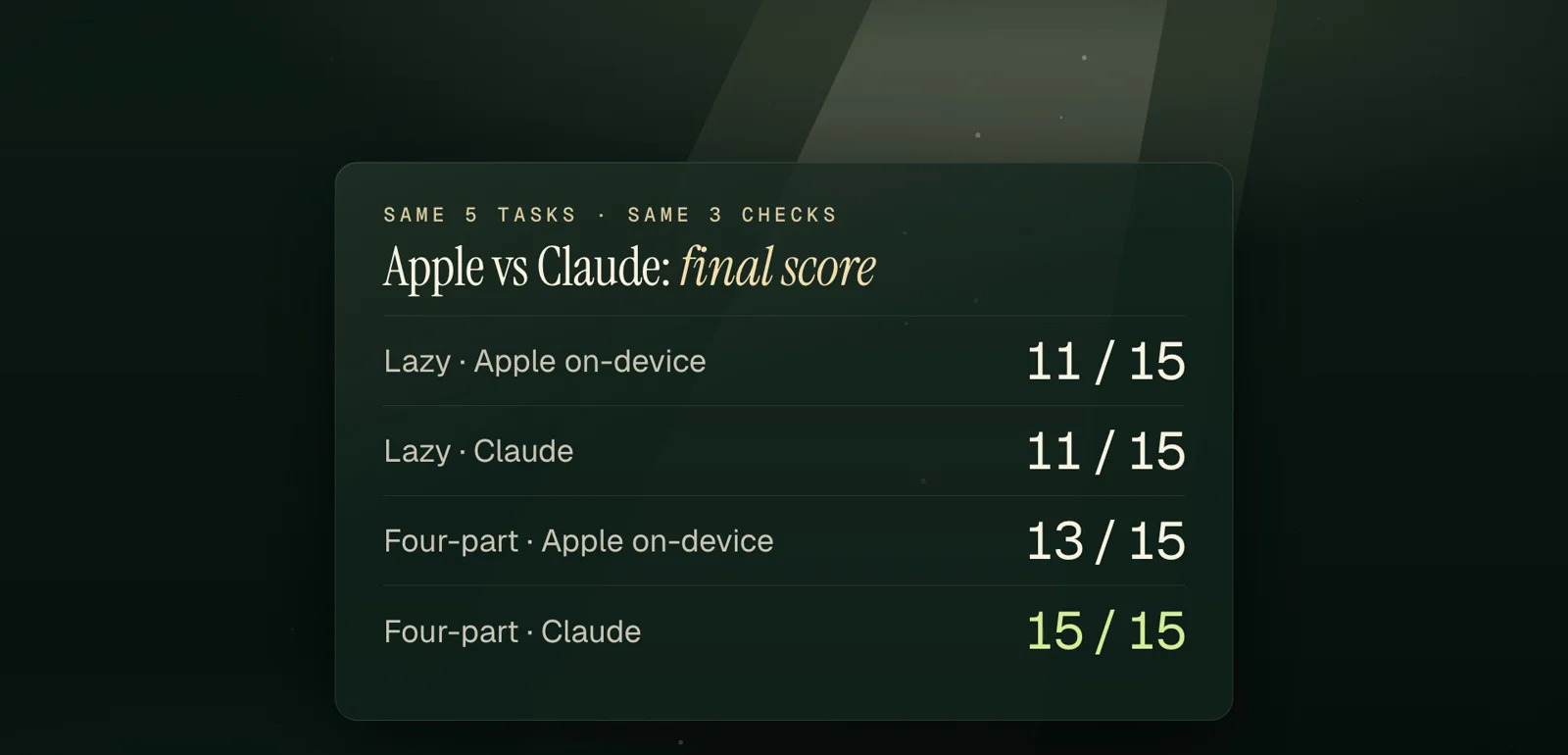
Same fictional inputs as our Claude test: a quiz from study notes, three slides for a family trip, messy notes into a dated to-do list, a confusing building notice, and saying no to hosting a family dinner. Each task once with a lazy prompt and once with a four-part prompt (Context, Goal, Example, Rules). Three checks per answer: right facts, nothing made up, ready to use. One fresh run per prompt, so this is a test, not a study.
| Task | Apple, lazy | Apple, four-part | Claude, four-part |
|---|---|---|---|
| Quiz from my notes | 2/3 (skipped the "two bridges" fact) | 3/3 | 3/3 |
| 3-slide trip outline | 1/3 (invented a history theme) | 1/3 (called Saturday a "mid-week event") | 3/3 |
| Messy notes to a dated to-do list | 3/3 | 3/3 (but listed "Sunday" last) | 3/3 |
| Confusing building notice | 3/3 | 3/3 | 3/3 |
| Saying no to hosting a dinner | 2/3 (signed "[Your Name]") | 3/3 | 3/3 |
| **Total** | **11/15** | **13/15** | **15/15** |
Where it slipped: three slides for a family trip
Context: I'm showing my family our weekend trip plan on the TV on Thursday night.
Goal: The text for a 3-slide presentation, one day per slide.
Example: Slide 1 - Friday: Train leaves at 9:10 a.m.
Rules: Use only these facts: Friday train at 9:10 a.m., Saturday museum at 2 p.m., Sunday train home at 5:30 p.m. Add no places, prices, bookings or activities I didn't give you. Three bullets per slide at most.
**Slide 1 - Friday**
- Train leaves at 9:10 a.m.
- Travel begins early
- First day on the move

**Slide 2 - Saturday**
- Museum at 2 p.m.
- Mid-week event
- Afternoon schedule

**Slide 3 - Sunday**
- Train home at 5:30 p.m.
- End of the trip
- Return journey starts
The rules said to add nothing and use three bullets per slide at most. It padded every slide to three, and Saturday is not mid-week. With the same prompt, Claude wrote one bullet per day.
Speed on our Mac
The first answer took 7.45 seconds because the model was loading. The next eleven took between 1.07 and 3.01 seconds, about 2.1 seconds on average.
Bonus: a voice memo to a to-do list, on the Mac
We made a 23.5-second fictional memo with a synthetic voice, added kitchen-style noise, and ran Whisper large-v3-turbo (OpenAI's open-source speech model, MIT license) with the free mlx-whisper package. It transcribed the memo in 2.54 seconds with every detail right (it wrote 1:30 as "1.30"). Asked plainly, Apple's model then dropped the plumber and the 10-to-noon window and added "Now" to two tasks. With this prompt, every detail came back:
Context: This is a voice memo I left myself for this week.
Goal: A to-do list I can check off.
Example: Fri - Dentist at 3:40
Rules: One line per task. Keep every person, day and time I said, word for word. If I gave no day, write "No day". Don't add anything I didn't say.

My voice memo:
[PASTE THE TRANSCRIPT]
Thu - Plumber between 10 and noon, someone has to be home
Wed - Mia's field trip form is due, she needs a packed lunch that day
No day - Book the vet for Pepper before November 15th, she's due for her shot
No day - Pick up milk, eggs, two lemons, and a bag of rice
No day - Call Aunt Rosa back about Sunday lunch, she said 1.30 works
Voice memo to to-do list, all on the Mac — Voice memo, Whisper: text, Apple on-device model, To-do list
Verdict
Worth it for short jobs on your own text: tidying notes, explaining a letter, a polite reply. It is fast, free and already there. It is not for research or long documents: Apple's developer page itself points to Private Cloud Compute or server models when you need more reasoning or a longer context. Use the four-part prompt, and read every list before you trust it.
Want a bigger free chatbot? Google's Gemma 4 12B is about an 8 GB download (Ollama's page), and Meta's Muse Glimmer is under 20 GB once compressed to about 4-bit (Meta's blog). We have not tested those yet.
Sources
- Apple Support, How to get the next generation of Apple Intelligence (devices, storage, languages)
- Apple Support, Use Apple Intelligence in Shortcuts on Mac (Use Model, On-Device; re-read October 20, 2026)
- Apple Developer, Foundation Models framework (what on-device models are good at; re-read October 20, 2026)
- OpenAI, Whisper on GitHub (MIT License)
- Ollama, gemma4 model page (12b download size; re-read October 20, 2026)
- Meta AI Research, Introducing Muse Glimmer (August 10, 2026)
Frequently asked questions
Can I run AI locally on a Mac for free?
Yes. Macs with an M1 chip or later and Apple Intelligence include an on-device model you can use in Shortcuts with the Use Model action (On-Device). Open models such as Whisper (speech to text) also run on the Mac for free. Bigger chatbots need a multi-gigabyte download.
Does Apple Intelligence work on a Mac mini M4?
Yes. Apple lists every Mac with M1 or later. We ran the on-device model on a Mac mini M4 with 24 GB of memory on October 20, 2026: about 2 seconds per answer after the first one.
Does Apple's on-device AI work without internet?
Apple says the On-Device option in Shortcuts handles simple requests without the need for a network connection. The Cloud and Cloud Pro options use Apple's Private Cloud Compute servers.
Go further
- Prompt: the four-part prompt for Claude (Context, Goal, Example, Rules)A fill-in-the-blanks prompt for any everyday task. Tested October 19, 2026 on Claude Sonnet 5.5 against lazy prompts on 5 tasks: 15/15 vs 11/15 on right facts, nothing made up and ready to use.See the prompt
- How to use Claude AI for free: we tested cheat-sheet prompts on 5 everyday tasksWhat Claude's free plan includes, where to click, and the four-part prompt (Context, Goal, Example, Rules) that scored 15/15 in our October 19, 2026 test on Claude Sonnet 5.5. Lazy prompts scored 11/15, and 'world-class expert' filler made things worse.Read the article
- How to fact-check ChatGPT answers: a copyable source-check prompt (tested on 2 AIs)ChatGPT can sound sure and still be wrong. This copyable prompt checks any AI answer against a source you trust and labels each claim VERIFIED, WRONG or CAN'T VERIFY, with an exact quote. Our October 18, 2026 test: Claude and GPT-6.1 both caught a planted wrong date.Read the article
Where should you start with AI?
The free assessment gives you, in 4 minutes, the 3 tasks to automate first in your business.