Claude Code for beginners: we built a reading tracker without coding
Claude Code is an AI that builds things on your computer while you describe them in plain words. We wanted to know if someone who has never coded can use it today, so we asked it for a small reading tracker, then clicked every button. We gave the exact same request to OpenAI's Codex. Here is what happened, what it costs and how to do it yourself.
First, is Claude Code free?
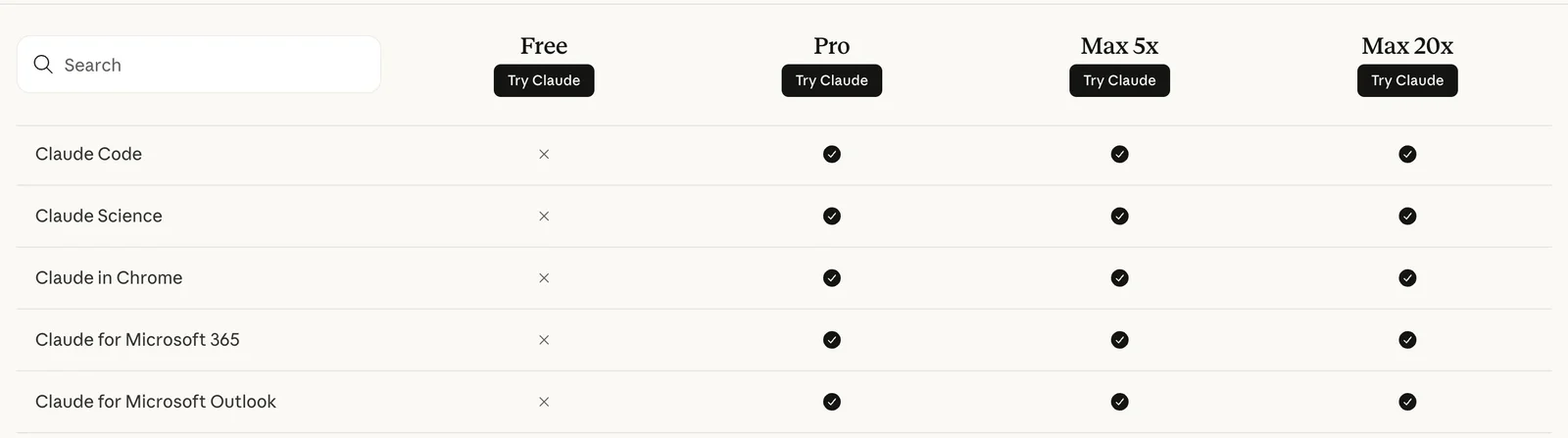
No. On Anthropic's pricing page, read on October 23, 2026, the Claude Code row shows a cross for the Free plan and a tick for Pro and Max. The page says Claude Code "is included in all paid plans". Pro costs $20 a month billed monthly, or $17 a month if you pay $200 for a year. If you want a free start, OpenAI's Codex is included in ChatGPT's Free plan, with the GPT-6 Luna model in the desktop app, "subject to rollout".
The request we typed
We wrote it the way a normal person would: what it should show, what each button does, the tricky cases, and where the file goes. Copy it and change the books to yours.
Build me a simple reading tracker that opens in my web browser.
Start it with three made-up books: River Walk, not read yet. The Blue Room, already read. Small Gardens, not read yet.
I want to:
- add a book by typing its title and clicking Add
- tick a box when I have read a book
- search my books by title, capital letters should not matter
- switch between All and Unread
- see how many books are showing
If I add the same title twice, keep them as two separate books: ticking one must not tick the other. Ignore extra spaces and never add a blank book.
Keep my list when I close and reopen the page, on this computer only.
No account, no payments, nothing sent online. Put everything in one file called index.html.
How we ran it
- Claude Code with Claude Opus 5.5, the default model on Pro according to Anthropic's docs, in a new empty folder, on October 23, 2026.
- OpenAI Codex with GPT-6.1 Sol at its "ultra" setting, in another empty folder, the same morning. That model is not the one the free plan gets.
- Both were told to work in their folder only, with nothing sent online. We did not touch the code.
What came back
Codex wrote its file in 1 min 47 s, Claude Code in 3 min 7 s. Both then tested their own work with a small script before answering. Claude Code explained more, including two limits we would not have spotted:
Your reading tracker is ready: it's the file **index.html** in this folder. Double-click it and it opens in your web browser. You don't need to install anything.
[…]
Two things to know:
- The list is kept by the browser you open it in. If you open the file in a different browser (Safari instead of Chrome, say), you'll see the starting list there instead of yours.
- You can't remove a book yet, because you didn't ask for that. If you add one by mistake, I can add a small delete button.
Your reading tracker is ready: index.html. Double-click it to open in your browser.

All requested features are included, with local saving and independent duplicate books. Passed 44 offline behavior checks.

Nothing is blocked. Browser testing was skipped as instructed; no network or server was used.
Our 10-check test
A tool saying "it works" is not proof, so we opened both files in a browser and clicked through the same ten checks, with zero internet requests:
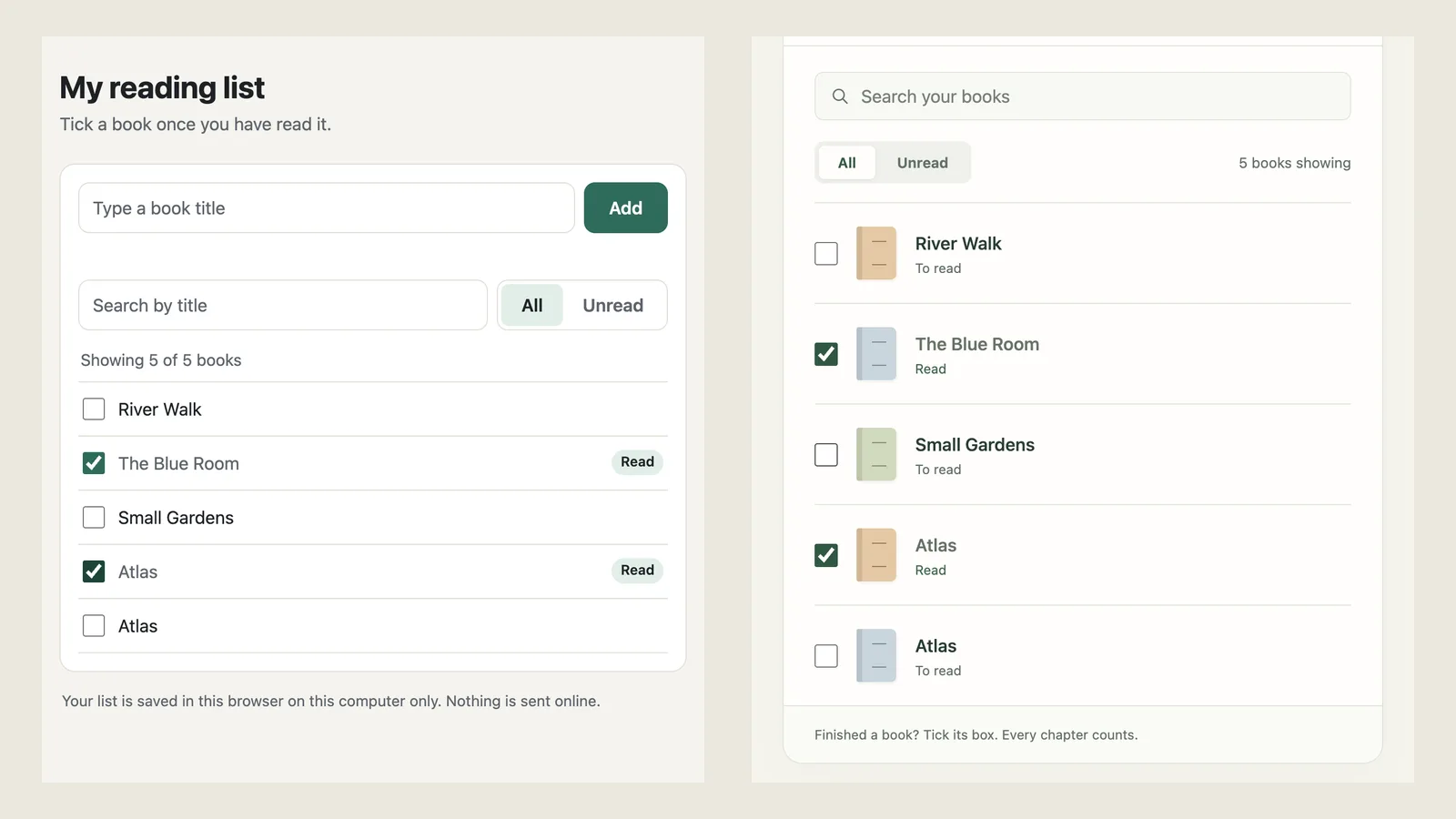
- It opens with 3 books and The Blue Room ticked.
- Searching room shows 1 book.
- Unticking The Blue Room works.
- Clearing the search shows all 3 again.
- " Atlas " with extra spaces is added as Atlas.
- A second Atlas is a separate book.
- A title made of spaces adds nothing.
- Ticking the first Atlas leaves the second one unticked.
- Unread shows 4 books with one Atlas; All shows 5.
- After a reload, all 5 books and their ticks are still there.
| Test | Claude Code | OpenAI Codex |
|---|---|---|
| Model | Claude Opus 5.5 | GPT-6.1 Sol, ultra |
| Request to finished file | 3 min 7 s | 1 min 47 s |
| Whole session, with its own checks | 4 min 7 s | 2 min 50 s |
| Our 10 checks | 10/10 | 10/10 |
| Delete follow-up, our 3 checks | 3/3 | 3/3 |
| Fixes we had to ask for | 0 | 0 |
Both scored 10 out of 10. Then we asked one follow-up: a Delete button that removes only the book you click, even when two books share a title. Both got it right first time, 3 out of 3, and Claude Code added an Undo link it told us about.
Thanks, it works. One more thing: add a small Delete button on each book. If I have two books with the same title, deleting one must keep the other.
Do it yourself in 5 steps
- Pick your plan
Claude Code needs Claude Pro or higher. Codex works on ChatGPT's free plan, with the GPT-6 Luna model.
- Install it
On a Mac, Anthropic's quickstart gives one line to paste in Terminal: curl -fsSL https://claude.ai/install.sh | bash. Claude Code also has a desktop app.
- Start in an empty folder
Make a new folder, open it, type claude, and sign in the first time it asks.
- Describe the result, not the code
Say what it shows, what each button does, the tricky cases, and "one file called index.html".
- Click everything, then ask for one change
Double-click the file, try every button, reload the page, and ask for one fix or feature at a time.
Building a small app with Claude Code, without coding — Describe it, Claude Code builds, Click everything, Ask one change
Our verdict
For a small personal tool, both worked on the first try, and neither needed a fix. Claude Code was slower but explained its limits in plain words, which helps a beginner. Codex was faster and is the one you can start for free. Whatever you use, test it yourself: our ten checks took two minutes.
Sources
- Anthropic, Claude plans and pricing: Claude Code not on Free, included in all paid plans; Pro $20 billed monthly. Read October 23, 2026
- Claude Code Docs, Quickstart: install command and the plans that can sign in. Read October 23, 2026
- Claude Code Docs, Model configuration: Pro and Max default to Opus 5.5. Read October 23, 2026
- OpenAI, Codex pricing: Codex included in ChatGPT Free, Go, Plus and Pro; Free and Go get GPT-6 Luna. Read October 23, 2026
Frequently asked questions
Is Claude Code free?
No. Anthropic's pricing page, read October 23, 2026, shows Claude Code is not on the Free plan and is included in all paid plans. The cheapest is Pro at $20 a month billed monthly, or $17 a month billed yearly.
Can a beginner use Claude Code without knowing how to code?
Yes, for small tools. We described a reading tracker in plain English and Claude Code built a working one-file app on the first try. You still need to install it, open a folder in Terminal and test the result yourself.
What is a free alternative to Claude Code?
OpenAI's Codex is included in ChatGPT's free plan, with the GPT-6 Luna model in the desktop app, according to OpenAI's pricing page read October 23, 2026. In our test we ran Codex with the paid GPT-6.1 Sol model, so the free version may do less well.
Go further
- How to use Claude AI for free: we tested cheat-sheet prompts on 5 everyday tasksWhat Claude's free plan includes, where to click, and the four-part prompt (Context, Goal, Example, Rules) that scored 15/15 in our October 19, 2026 test on Claude Sonnet 5.5. Lazy prompts scored 11/15, and 'world-class expert' filler made things worse.Read the article
- ChatGPT vs Claude vs Grok: we tested them on 5 everyday tasksSame 5 everyday prompts, 3 AI assistants, 4 checks per answer. Final score: GPT-6.1 (through OpenAI's Codex) 19/20, Claude Sonnet 5.5 18/20, Grok in Fast mode 15/20. The gaps hid in the fine print: budgets that don't add up and details nobody gave.Read the article
- Run AI locally on a Mac for free: we tested Apple's built-in AI on 5 everyday tasksMacs with an M1 chip or later already carry an on-device AI model. We ran it on a Mac mini M4 on October 20, 2026 with the same 5 everyday tasks we gave Claude: 11/15 with lazy prompts (Claude: 11), 13/15 with a four-part prompt (Claude: 15), about 2 seconds per answer.Read the article
Where should you start with AI?
The free assessment gives you, in 4 minutes, the 3 tasks to automate first in your business.